How to Identify Anonymous Website Visitors and Book Calls
To turn anonymous website visitors into booked calls, name each visit with a visitor ID tool like RB2B, check your CRM so customers and open deals go to their owner, find and verify the buying committee, score fit and timing, then call the best accounts while the visit is fresh and email the rest. Here are the eight steps.
 Adam Abdur RahmanFounder, Revgrowth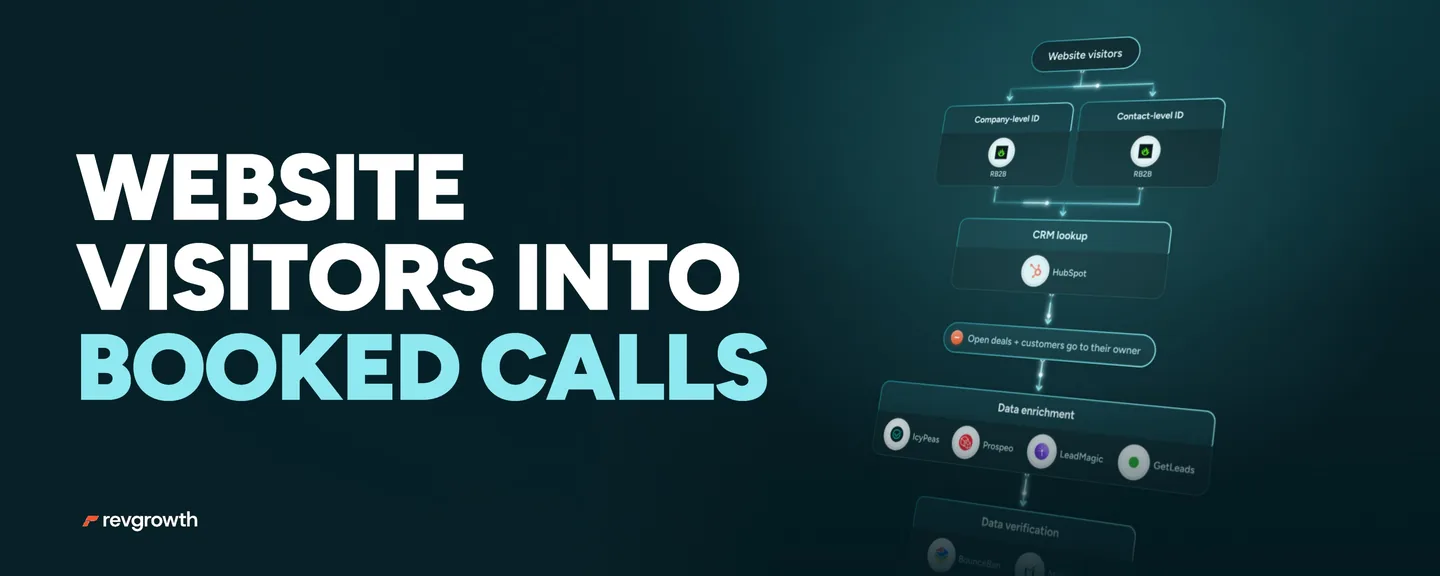
We've generated $30M+ in pipeline across 10M+ cold emails.
Every day, buyers read your pricing page and leave without a word.
They never fill in a form, and your analytics report counts them as a number.
Visitor ID tools like RB2B can put a name to a slice of your visitors.
How big a slice depends on the tool and your traffic.
Those people came to you, so they're warmer than any cold list.
Warm shows interest. Budget and timing are still unknown.
A name is step one of eight.
The next few minutes decide whether the visit becomes a call.
Below is the full build in eight steps, with the exact tools for each one.
If your site gets steady traffic and your reps only hear from people who fill in a form, this is for you.
The Full Build
Step 1: Identify the Visit and Read It
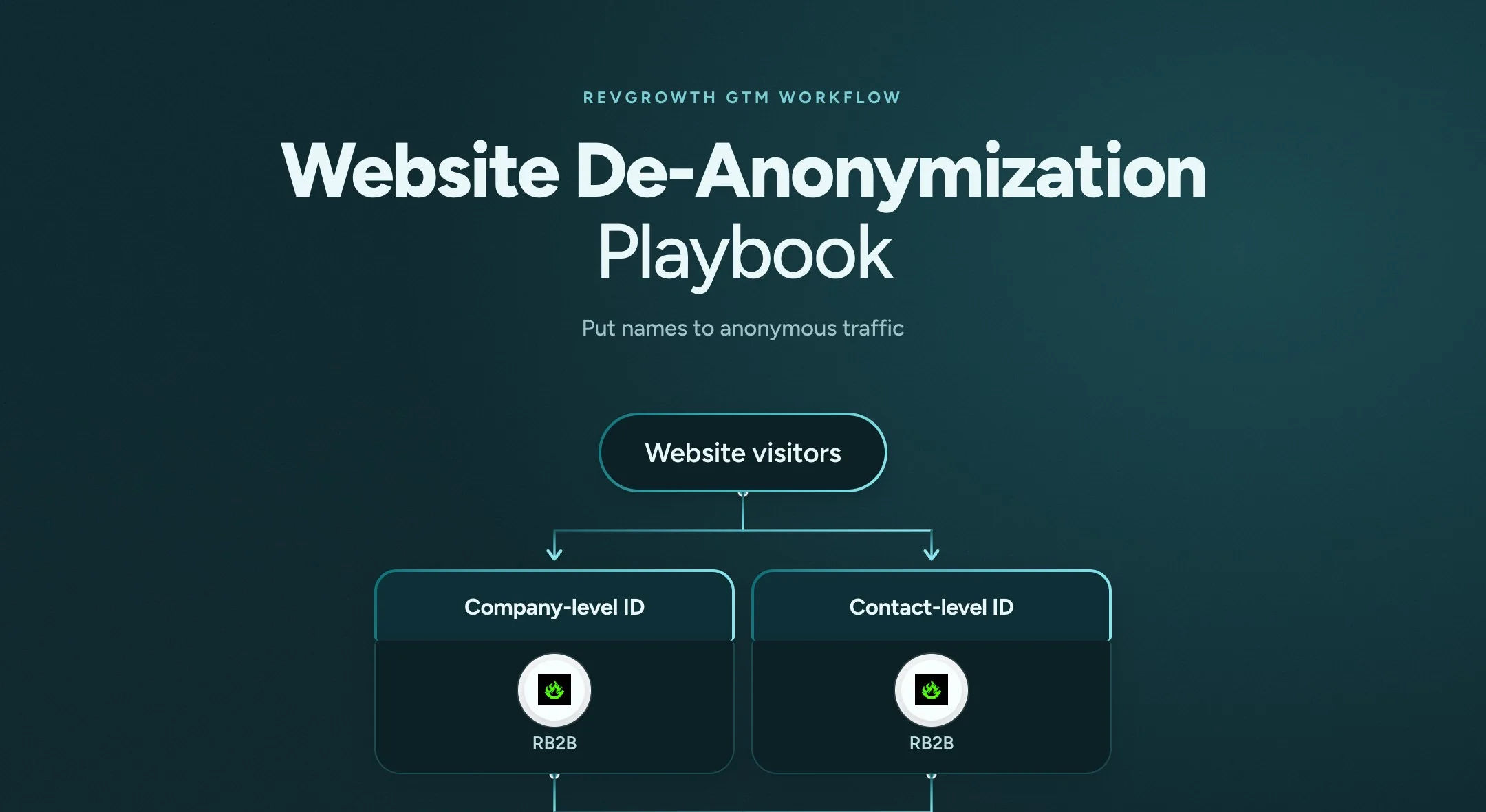
A visitor ID tool (RB2B/Warmly/Getleads) names the company behind each visit, and the person when it can.
Each identification starts the workflow the moment it happens.
A match can be wrong, and a visit can come from a student, a job seeker or a competitor.
The depth of the visit is the signal.
- Pricing, demo and case study pages
- Repeat visits
- Several people from the same account
Several people from one account can mean a team comparing options, or one person on two devices.
Log every visit on the account's HubSpot record with its type and time.
Step 2: Check the CRM Before Anything Else
Look up every visitor in HubSpot by email or domain.
- A customer or open deal goes to its owner, never into cold outreach
- Anyone already in an active sequence is left alone until it ends
- Anyone new to you moves on to enrichment
Only run the lookup on a real email or domain. A blank field would match the wrong record.
The check is only as good as your CRM, so keep customers and open deals up to date.
Step 3: Find the Buying Committee
Start from the visitor, or from the company when only the company is known.
Then map three people at the account.
- The decision maker
- A likely champion
- A day-to-day user
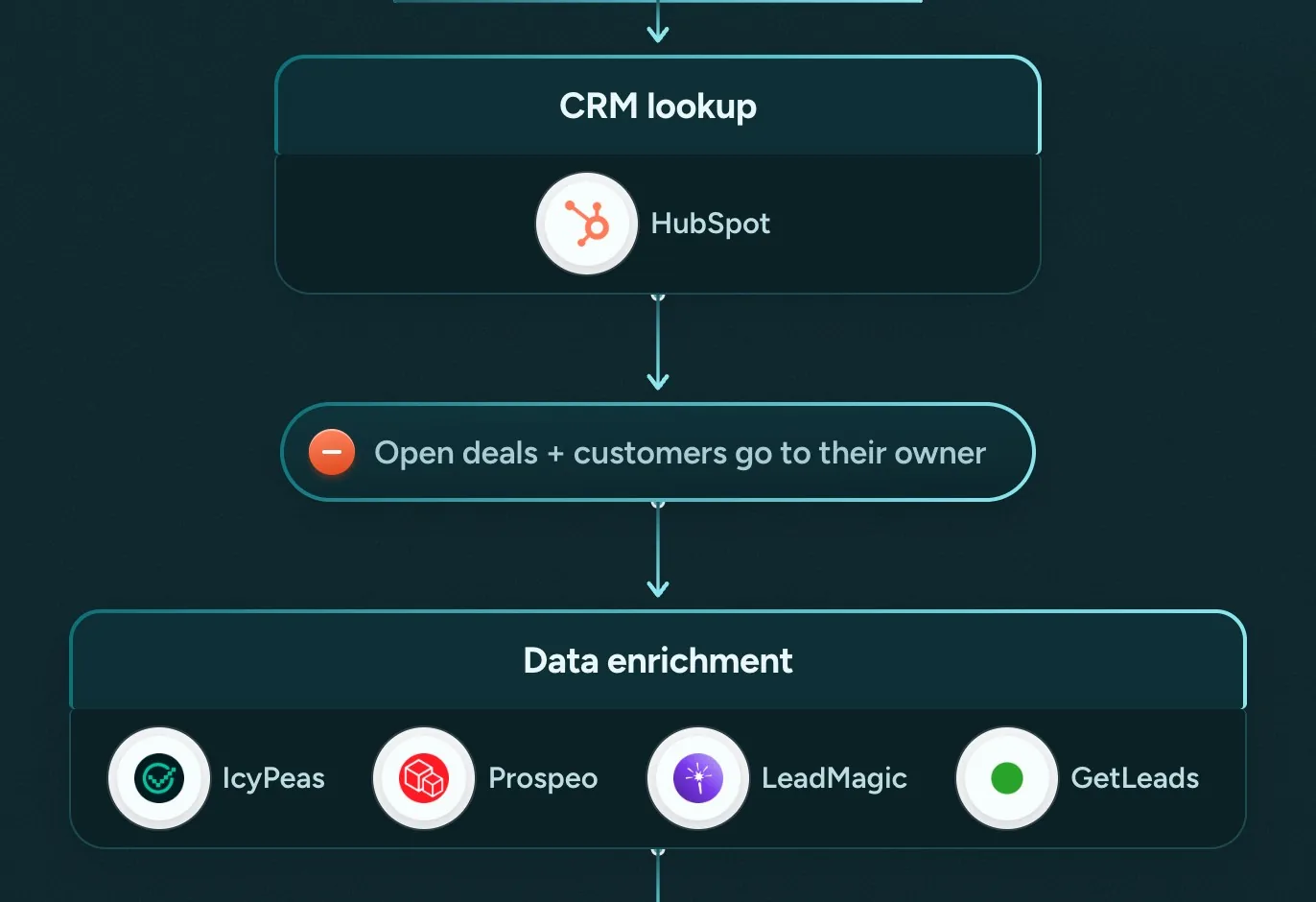
Run a waterfall through IcyPeas, Prospeo, LeadMagic and GetLeads.
Each tool only looks for the people the one before it missed, so a company-only match still gives your rep three people to reach.
Step 4: Verify Every Email Twice
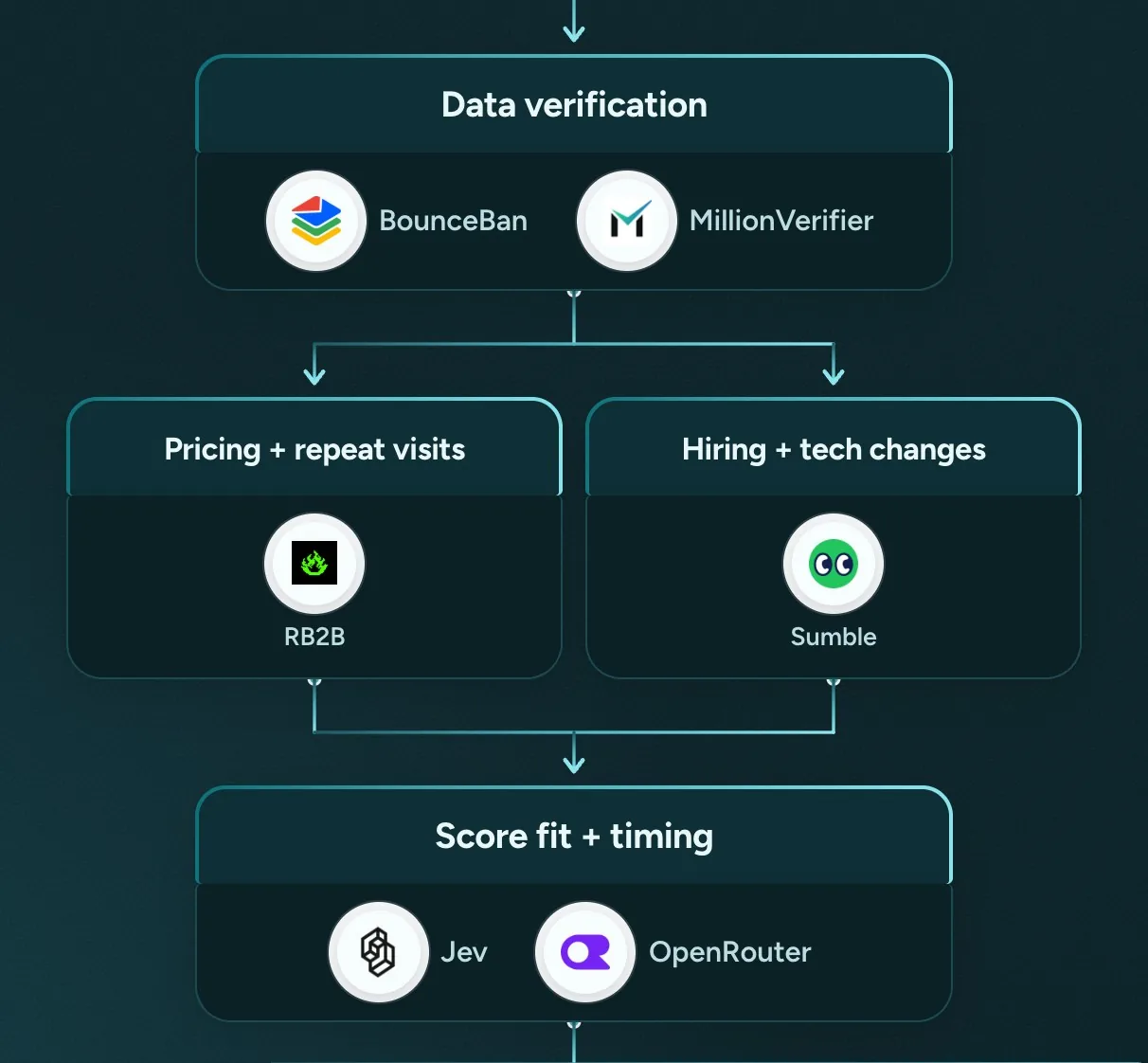
MillionVerifier checks every address first. BounceBan checks every one that passes.
- Valid addresses go on to the campaign
- Catch-alls (domains that accept any address) stay only if BounceBan marks them deliverable, and they send from their own campaign
- Invalid, disposable and unknown addresses are removed
The check that comes with an enrichment vendor never counts as one of the two.
Step 5: Add What Is Changing at the Company
The visit shows interest. Sumble shows what is moving at the account.
- Hiring and team growth
- Tech-stack changes
- Funding and leadership changes
A Sumble match only counts on the account's exact domain.
Every signal lands on the HubSpot record, stamped with its type and time.
Step 6: Score Fit and Timing
An AI model (Jev, OpenRouter) scores each account on two things.
Fit against your ideal customer profile (ICP), and timing from the visit and the signals around it.
It scores and sorts. It never enriches.
Here's a prompt to start from.
You're scoring a website visit for fit and timing.
Here is our ICP.
[paste your ICP]Here is the visit.
[paste the company, the person if known, the pages they read, how often they came back, how many people from the account visited and what's changing at the company]Reply in three lines. Give the fit (strong, partial or weak), the timing (cold, warm or active), and the reason in one sentence.
If the evidence is thin, reply "unscored".
Fixed rules set the tier.
- Tier one is a strong fit with signals stacking up
- Tiers two and three are a partial fit, or a strong fit with one signal
- A weak fit, or a disqualifier such as a competitor, gets no message
A score is a first pass, so read a sample by hand each week.
Step 7: Alert and Call Tier One
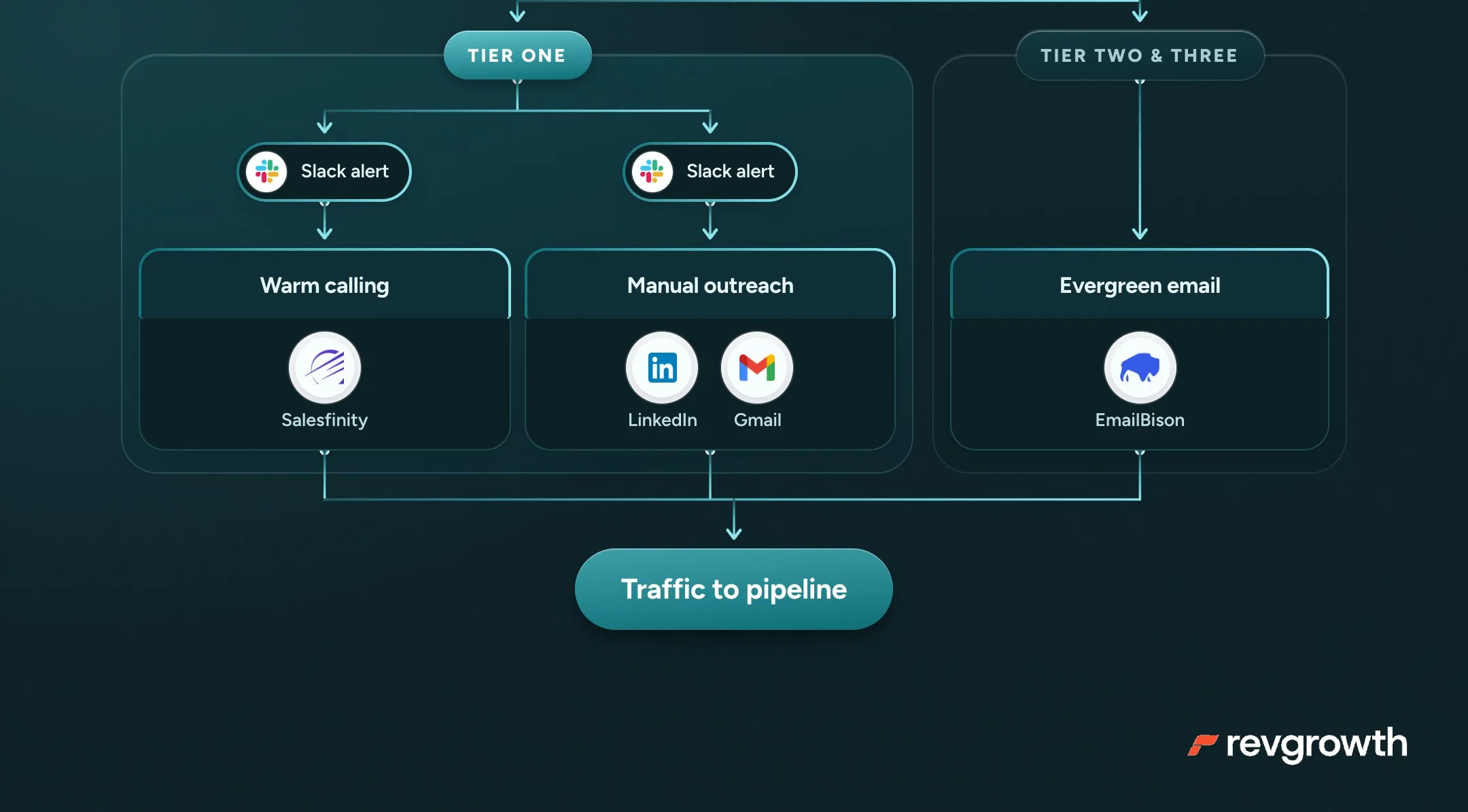
A Slack alert goes to the account owner and names the signal, like repeat visits to pricing.
Then the owner works it one to one, while the visit is still fresh.
- A warm call
- A personal note (LinkedIn or Gmail)
- A short personal video
Alert on tier one only, or the channel turns into noise.
Whatever the rep does from the alert gets written back to the CRM.
Pro tip
One of the best plays teams are running is when a lead views a high-intent page, like your pricing or demo page, but doesn't book a call.
An SDR gets notified, then warm calls the prospect with a consultative approach.
Open with questions about what they're trying to solve, and don't mention the visit.
Step 8: Email Everyone Else, Always On
Tiers two and three join an email sequence (EmailBison/Smartlead/Instantly) that never switches off, so new visitors enter as they're identified.
The first email opens on what the visit points to, then leads with a case study and a gift.
- Give the result you got for a company like theirs, in numbers they care about
- Offer something small you built for them for free, like a sample list, an audit or a mockup
- Say in one line what you do and who you do it for
- Use your customer's words for the problem, from your calls
Keep the usual rules.
- Two emails in total, and no link in the first. Send the gift as a reply once they say yes
- Frequency caps limit how often one person hears from you, and an account that engages moves up to tier one
Open on the problem the page points to, and leave out the fact that you tracked the visit.
Lead with a case study from a customer who has proven out. A brand-new win has had no time to show results that last.
Here's a first email to adapt.
Subject: {the result} for {a company like theirs}
Hi {first name},
Teams looking at {your category} tell us "{the problem, in their words}".
We helped {a company like yours} {get the result} in {time}.
{Their company} looks a lot like them, so I put together {the gift} for you. {One line on what's inside.}
We {what you do} for {who you do it for}.
Want me to send it over?
Name the customer in your case study only if they've said yes. Otherwise describe them, like "a payroll company in Ohio."
Keep every claim in it true for every company on the list.
Your First Week
One step a day.
- Set up RB2B (or website de-anonymization tool of choice) and log every visit to your CRM.
- Add the CRM check so customers and open deals go to their owner
- Enrich and verify the committee for one week of visitors
- Score the batch with the prompt above and write the tier rules down
- Turn on the Slack alert for tier one, and write two emails around a case study or well crafted message for everyone else
The full playbook is mapped step by step, with every tool, at revgrowth.ai/playbooks/website-de-anonymization