The Outbound Sales Playbook We Run, in 8 Steps
A modern outbound system starts from your closed deals, maps your whole market from more than one source, qualifies every account before you pay for a contact, verifies every email twice and makes each email feel like a gift. Here are the eight steps we run, with every tool, and how it differs from an AI SDR.
 Adam Abdur RahmanFounder, Revgrowth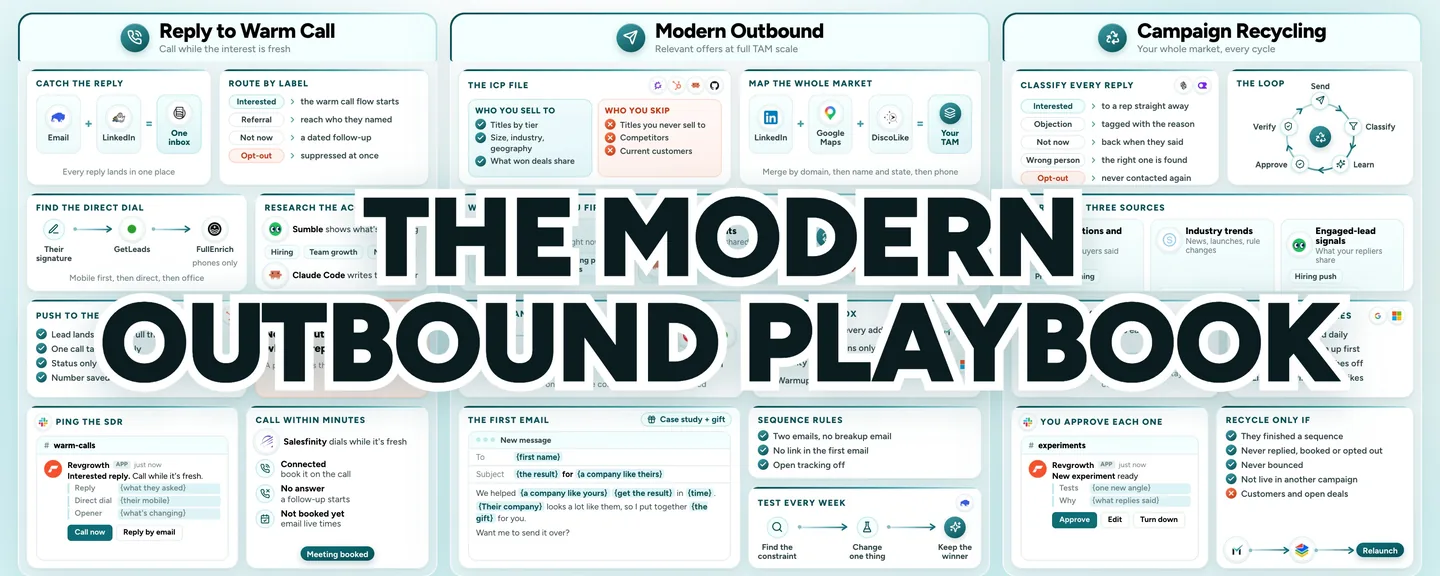
We've generated $30M+ in pipeline across 10M+ cold emails.
On a sales call, I walked a founder through our whole outbound system.
At the end, he told me he'd tried an AI SDR and he asked how we're any different.
Below is pretty much exactly what I showed him. Eight steps, with the exact tools for each one, and my answer to his question at the end.
If you sell B2B and you've tried an AI SDR, or you're thinking about one, this is for you.
The Full Build
Step 1: Start With Your Closed Deals
The first step is always the data you already have.
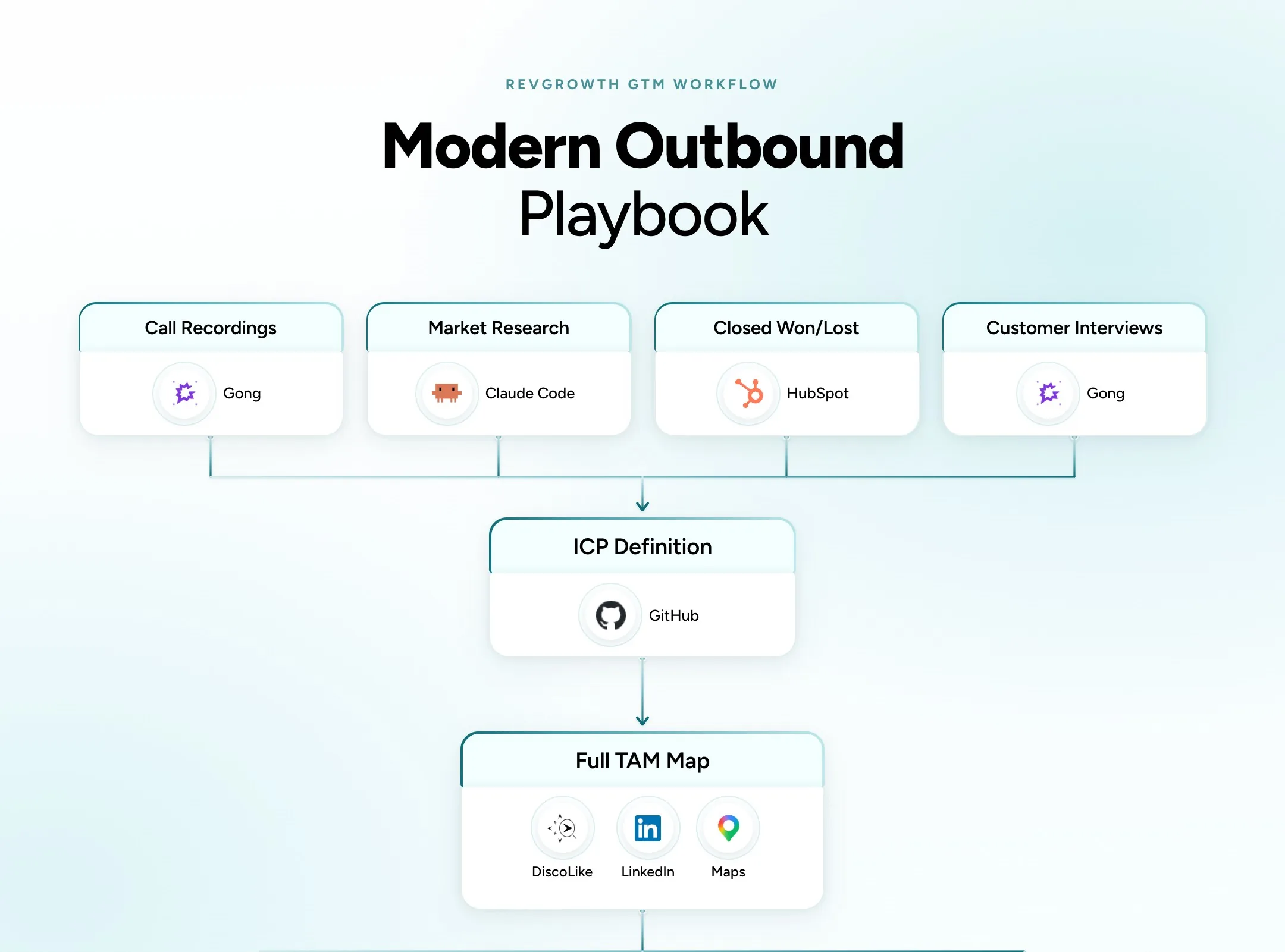
Pull your closed won and closed lost deals from your CRM (HubSpot) and look for the patterns.
Who are your best customers? Who are your worst?
That tells you who to reach out to more, and who not to reach out to at all.
Compare the website content, open roles and tech stack on both sides. Whatever separates the two groups goes into your ideal customer profile, or ICP.
Then add the buyer's own words from your call recordings and customer interviews (Gong). You'll use them again in your emails.
Claude Code runs the market research on top, with segments and personas.
Write it all into one file (GitHub).
- Titles by tier, plus the titles you never sell to
- Company size, industries and geography
- Disqualifiers, competitors and current customers
Keep it in a file instead of a static spreadsheet, because the ICP is dynamic. It changes month to month as you test and learn.
Review it every quarter against the last 90 days of results.
Step 2: Map Your Whole Market
With the ICP written, build your total addressable market. That's every company you could conceivably reach out to.
No single database holds a whole market, so pull from three sources.
- LinkedIn, for companies and the people who work there
- Google Maps, for the local and owner-run businesses LinkedIn databases often miss
- A lookalike tool (DiscoLike), which finds companies by what their websites say. Give it your best customers and it finds companies just like them
Merge the three and remove duplicates. Match by domain first, then by company name and state, then by phone number.
Treat any one source's count as a floor for the size of your market.
Step 3: Decide Who Hears From You First
Once your market is mapped, three things decide who goes first and what you say.
The first is signals, the people showing interest right now.
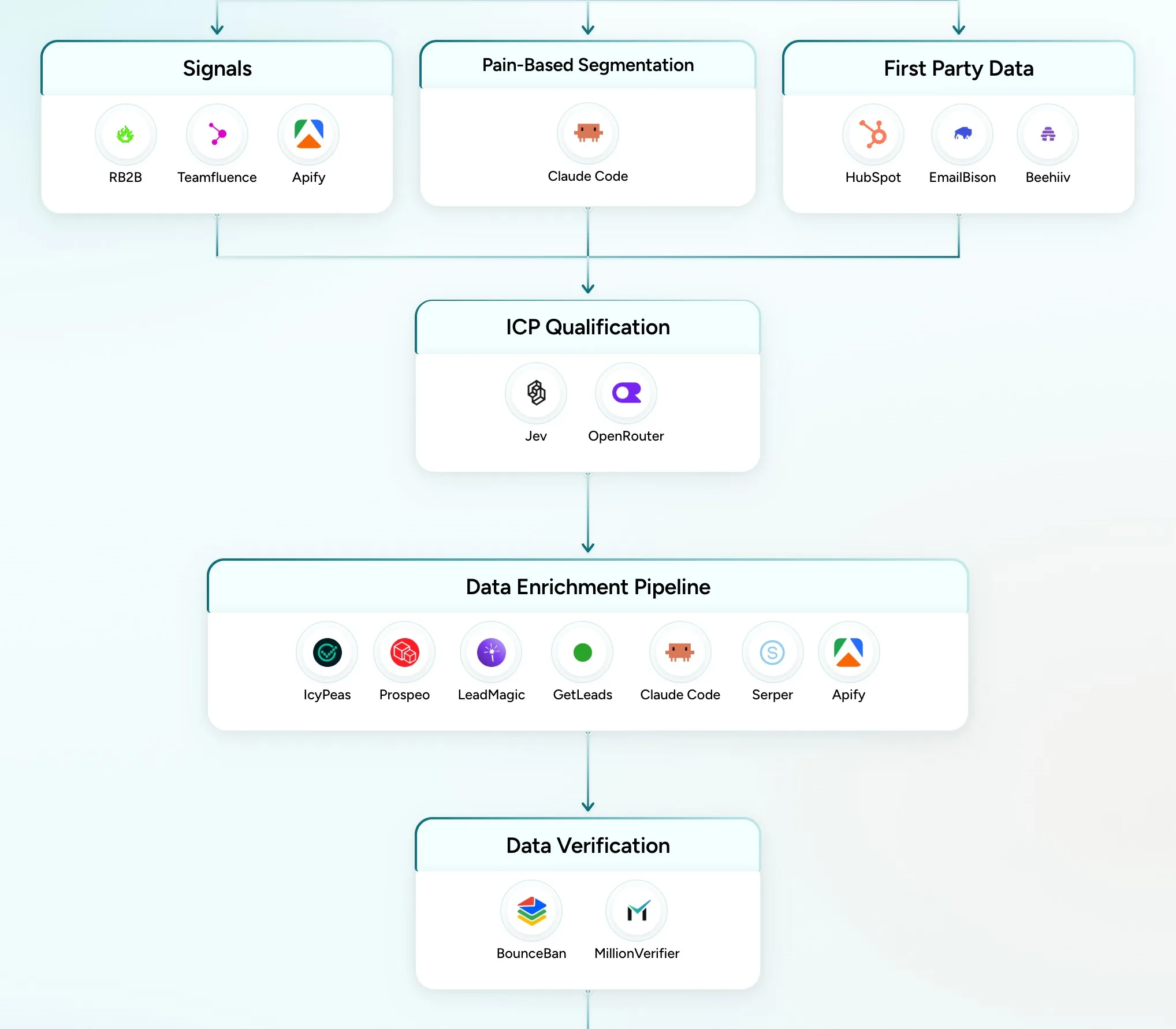
- A visitor ID tool (RB2B) names some of the people visiting your site. Watch high intent pages like pricing
- A scraper (Apify) and a LinkedIn tracker (Teamfluence) show who engages with posts from you, your team and your competitors, and who follows a competitor's page
Only recent events count. A signal is a reason to look closer, and Step 4 still decides who fits.
One of the best plays here keeps a human in it. Someone views your pricing page, you find their contact info, and an SDR gives them a warm call. "Hey, anything I can help you with?"
The second is pain. I don't believe in spray and pray, hitting every contact in your market.
There are pockets of your market experiencing a certain type of pain. Draw a hypothesis on what that pain is, then write to it.
Claude Code groups the accounts by the problem they share, and each pain segment gets its own offer.
Here's a prompt to start from.
You're grouping companies by the problem they share.
Here is our ICP.
[paste your ICP file]Here are the accounts, with what each one sells and who it sells to.
[attach your account list]Here's how our buyers describe the problem, in their own words.
[paste a few lines from your calls]Group the accounts into pain segments. For each one, give a short name, the problem its companies share, the accounts in it and a line a buyer there would recognize.
Put each account in one segment only.
The third is the people you've already reached.
- Past campaigns (EmailBison)
- Old CRM leads (HubSpot)
- Your newsletter list (Beehiiv)
Some of them never moved down the funnel. Re-engage them with a new angle. Launching something new? That's your angle right there.
Hold out current customers and open deals, and remove anyone already in a live campaign, so nobody gets two sequences at once.
Step 4: Qualify and Enrich Every Account
Your whole market is the pool. Only the accounts that pass this step get emailed.
Claude Code reads each company's own website, since the industry labels in data vendors are noisy.
Then an AI model (Jev, OpenRouter) checks each account against your ICP file, and poor fits come out before you pay for a single contact.
Check a sample by hand, since a thin website can mislead the model.
Then pick the decision maker by company size.
- Up to 50 people, the owner, founder or CEO
- 51 to 200, a VP or director, plus the C-suite
- 201 to 500, a director, then a VP, then the C-suite
To find their emails, run a waterfall through IcyPeas, Prospeo, LeadMagic and GetLeads.
Each vendor only sees the contacts the ones before it missed, so you never pay twice for the same person.
A scraper (Apify) and a search API (Serper) fill the gaps vendor data misses, like headcount and open roles.
Step 5: Land in the Inbox
You want to be very comfortable that every email you send lands in an inbox someone still checks.
So every address gets checked twice before anything sends.
MillionVerifier goes first, and BounceBan checks every one that passes.
- Valid addresses go into the main campaign
- Catch-alls, which are addresses on domains that accept any email, stay only if BounceBan marks them deliverable, and they send from their own campaign
- Invalid, disposable and unknown addresses are removed
An enrichment vendor's own check never counts as one of the two.
Then set up where you send from. Never send from your primary domain. Send from secondary domains, so if a domain or a couple of inboxes get flagged, you swap them out and your main domain is never touched.
Mail goes out through EmailBison from Google and Microsoft inboxes, each capped at 20 sends a day.
Warmup stays on for every inbox, always.
If you can't land in the inbox, none of this really matters.
Step 6: Make Every Email Feel Like a Gift
My philosophy is to make every message feel like a gift versus a burden. How can you make it so valuable the prospect is actually happy to get the email?
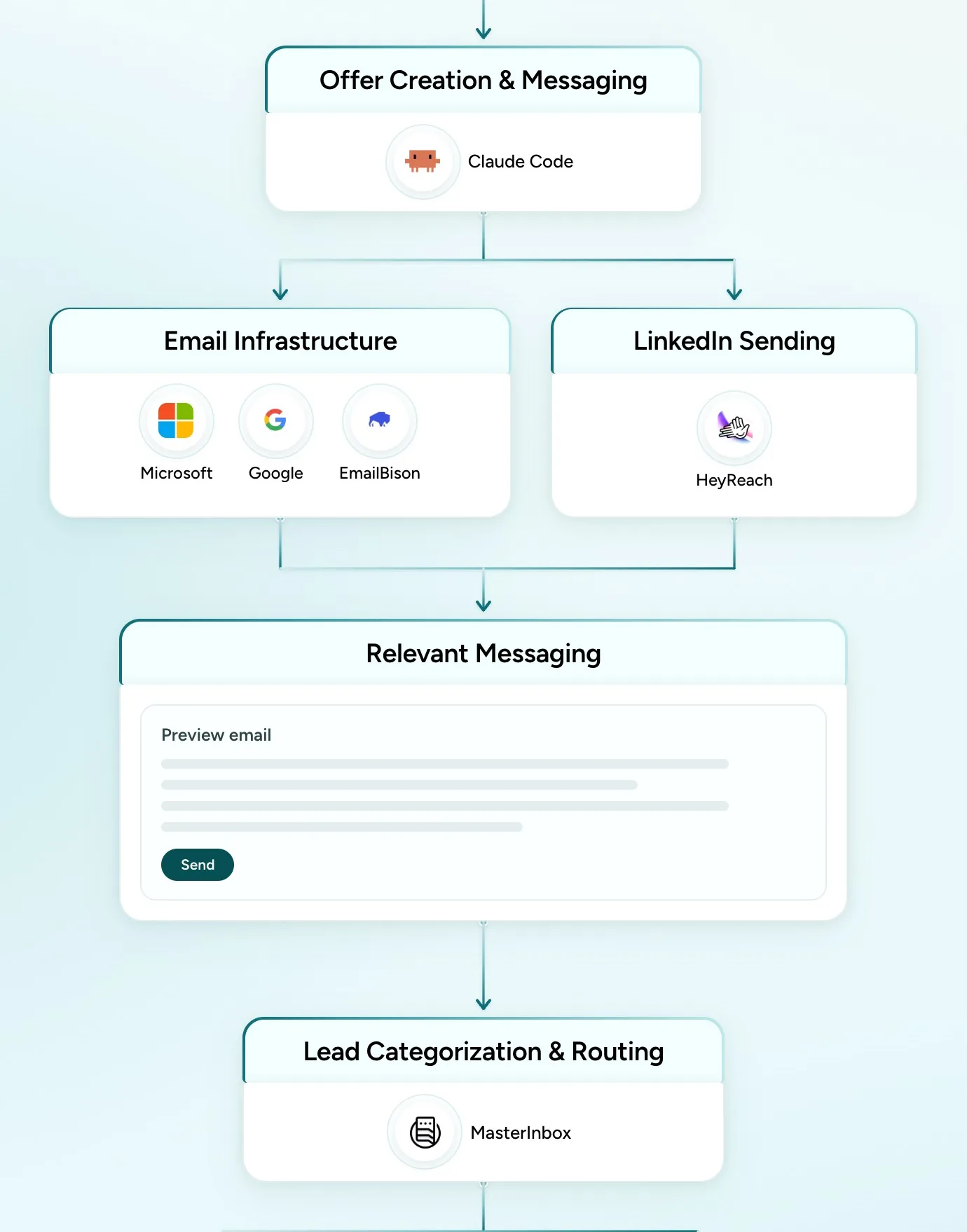
Claude Code drafts one offer per pain segment, in the words buyers used on your calls.
- Open with the result you got for a company like theirs, in numbers they care about
- Offer something small you built for them, like a sample list, an audit or a mockup
- Say in one line what you do and who you do it for
Here's a first email to adapt.
Subject: {the result} for {a company like theirs}
Hi {first name},
We helped {a company like yours} {get the result} in {time}. Before that, {the problem, in their words from your calls}.
{Their company} looks a lot like them, so I put together {the gift} for you. {One line on what's inside.}
We {what you do} for {who you do it for}.
Want me to send it over?
Name the customer only if they've said yes. Otherwise describe them, like "a dental group in the Midwest."
Every sequence follows the same rules.
- Two emails in total, and no breakup email
- No link in the first email. Send the gift as a reply once they say yes
- Open tracking off
HeyReach runs LinkedIn alongside email.
Keep each campaign at 1,500 to 2,000 contacts, so its result is readable.
Step 7: Answer Every Reply Fast
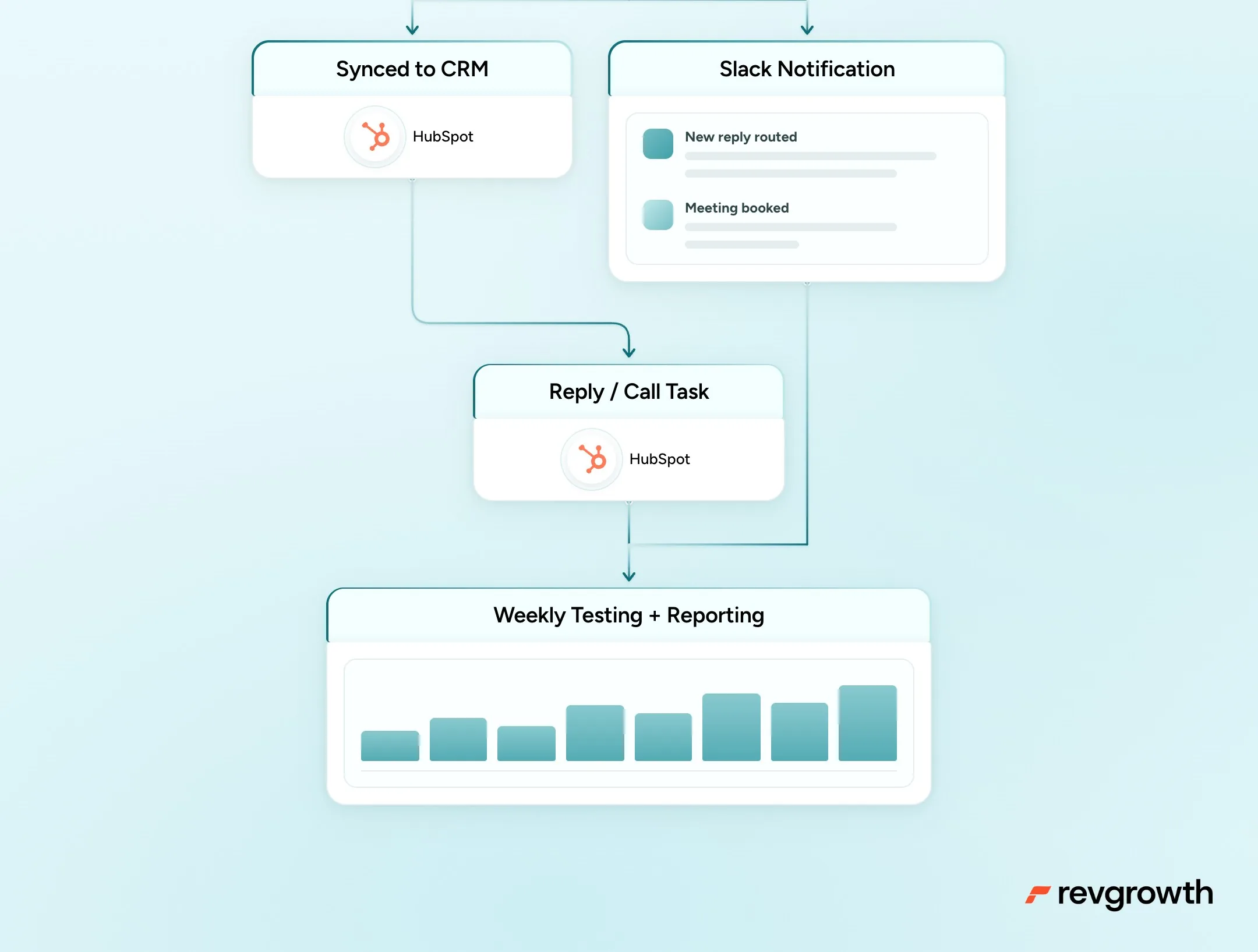
Replies from email and LinkedIn land in one inbox (MasterInbox), where AI labels each one by intent.
- An interested reply becomes a reply or call task for the rep in your CRM (HubSpot)
- A referral means the person they named gets contacted next
- A "not now" becomes a dated follow-up
- An opt-out is suppressed at once
Leads sync to your CRM with the full thread attached (OutboundSync), and Slack pings the team on every routed reply and every booked meeting.
No one dedicated to replies? An AI agent with your company's context can answer them, fully on its own or with a human in the loop who approves each draft before it sends.
Either way, aim to answer within 5 to 10 minutes.
Step 8: Test Every Week
Every week, look at the numbers and find the constraint.
Then pull the one lever that gives you the biggest bang for your buck.
Every Monday, check each campaign (EmailBison).
- Bouncing over 3% gets paused
- Bouncing at 2% gets watched for the week
- No interested replies in two weeks means new angles
Each week, one segment gets five to seven new versions to test.
Each version changes one thing only, the subject, the first line or the offer.
Review every version before it sends. The winners feed the next offer.
Ideally, you learn something new every week, about your market or about what gets replies.
So How Is This Different From an AI SDR?
Here's what I told him.
There's a big gap between an AI agent and someone who's been running these systems for years. There's a taste element, knowing what good actually looks like.
LLMs produce the average by default. You only get an excellent outcome when someone with real expertise and taste is steering them.
AI SDR tools can run pieces of this system. So let AI do the heavy lifting, like reading websites, grouping accounts and drafting emails.
Keep a human with taste on the ICP, the offer and the weekly call on what to test next.
Your First Week
One step a day.
- Write the ICP from your closed deals, and set up your sending domains so warmup starts now
- Map your market from more than one source and merge it by domain
- Group the accounts by pain, and pull the past leads you'll re-engage
- Read every website, find the buyers and verify every address twice
- Write one offer per segment around a case study and a gift
Where to Start
Start with the people who already know you. Re-engaging the leads you already have is the lowest hanging fruit for any team.
The full playbook is mapped step by step, with every tool, at revgrowth.ai/playbooks/modern-outbound