How to Scrape Google Maps for Leads and Owner Emails
To build a lead list of local businesses, pull every listing from Google Maps one ZIP code at a time, add Overture's free map data, find each owner on their website and in their replies to Google reviews, then verify every email twice before you send. Here's the full build, with every tool and what it costs.
 Adam Abdur RahmanFounder, Revgrowth
We've generated $30M+ in pipeline across 10M+ cold emails.
If you sell to local businesses, your whole market is sitting on Google Maps.
Roofers, dentists, HVAC shops, gyms, med spas, law firms.
Pulling the list is the easy part. Sweeping a whole city for one type of business costs about a dollar.
Getting to the owner, the one person who can say yes, is where local outbound makes money or falls apart.
So this is the full build, from a blank sheet to a booked call, with every tool, the prompt we'd start from and what each step does for your pipeline.
Why Your Local Market Isn't in Your Sales Database
A plumber with six trucks usually doesn't have a LinkedIn page. Neither does the dentist who owns her practice, or the guy who runs the gym down the street.
B2B contact databases are built from LinkedIn and company websites, so owner-run local businesses barely show up in them.
Search one for restaurants in your city, then search Google Maps. You'll see the gap in about a minute.
Google Maps has nearly all of them, because a local business lives or dies by showing up when someone types "roofer near me".
That gap works in your favor. The businesses your competitors can't find in their database are the ones nobody else is emailing.
The Full Build
Step 1: Pull Every Business From Two Sources
Your pipeline can only be as big as your list, so this step sets your ceiling.
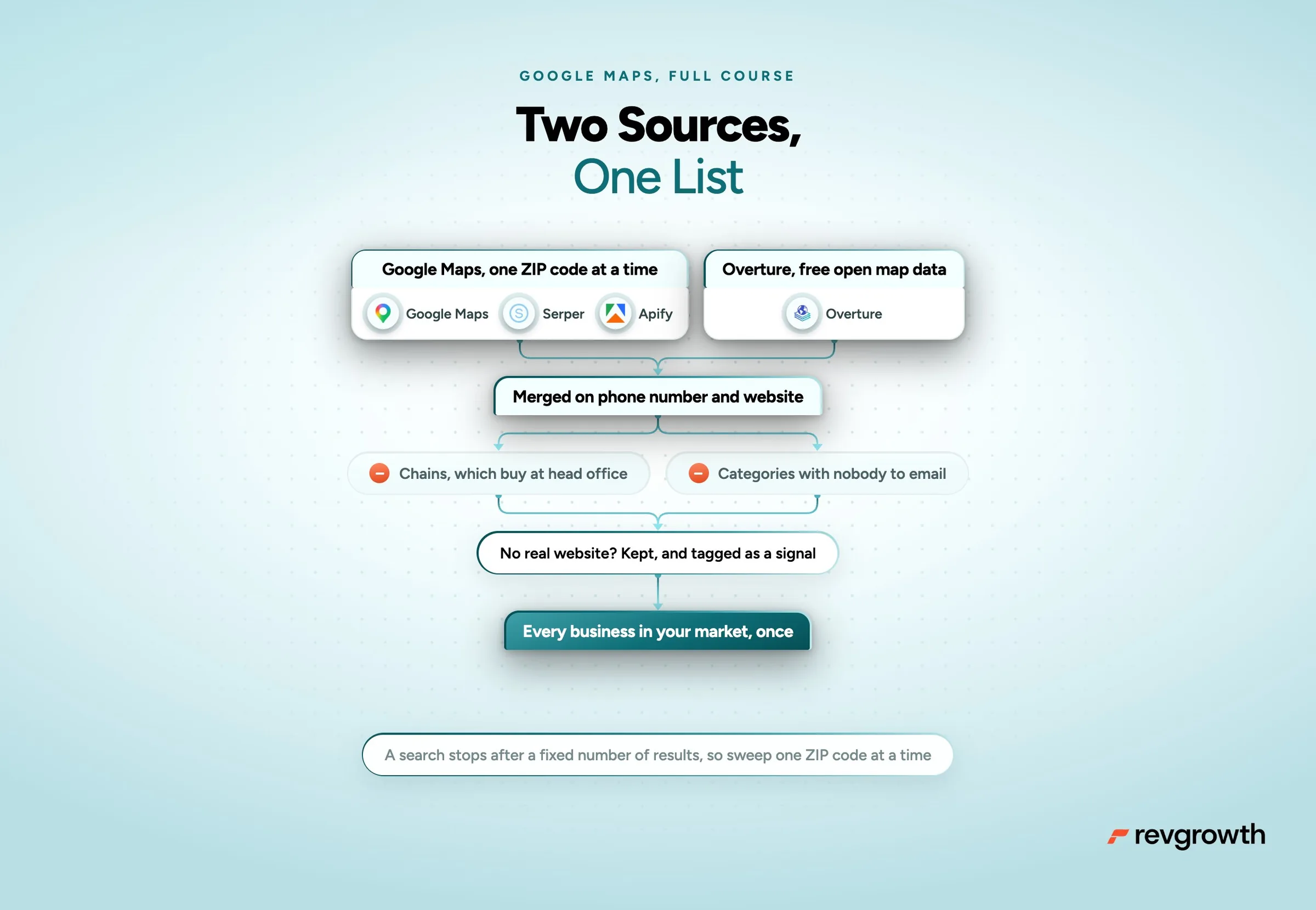
Start with Google Maps. Pull it through a search API like Serper, or a ready-made scraper like Apify or Outscraper.
Search one ZIP code at a time.
Reason why is Google Maps stops at about 120 results per search, and Serper hands you 20 per call. Search "roofers in Houston" once and you get a sliver of the city. Run the same search ZIP code by ZIP code and you get the whole thing.
If a ZIP code still fills up, split it again or search it with a second term, like "roof repair".
Then pull the free version.
Overture Maps is open map data from the foundation Amazon, Meta, Microsoft and TomTom started. Its business listings come mostly from Meta and Microsoft, and you can download them for free, including for commercial use.
In the middle of Houston alone it lists over 140,000 places. About 8 in 10 have a website, 9 in 10 a phone number and 3 in 10 an email.
One query pulls a whole niche. This one runs in DuckDB, a free tool for your laptop, and pulled 1,086 Houston roofers in 8 seconds.
SET s3_region = 'us-west-2';
COPY (
SELECT names.primary AS name, websites[1] AS website, phones[1] AS phone,
emails[1] AS email, addresses[1].freeform AS address, addresses[1].postcode AS zip
FROM read_parquet('s3://overturemaps-us-west-2/release/2026-09-23.1/theme=places/type=place/*')
WHERE taxonomy.primary = 'roofing' AND confidence >= 0.5
AND operating_status IS DISTINCT FROM 'permanently_closed'
AND bbox.xmin BETWEEN -95.9 AND -94.9 AND bbox.ymin BETWEEN 29.4 AND 30.2
) TO 'roofers.csv';
Swap in the newest release name from Overture's docs, your own category and your own map box. No code? Overture's Explorer at explore.overturemaps.org downloads whatever is on your screen.
Use both sources. We tested them on Houston roofers, and only about half of Google's roofers showed up in Overture. Overture's extras were rougher, with about half of them real, working roofers, and it misses smaller shops. So use it to add businesses to your Google Maps pull.
Merge the two on phone number and website so each business shows up once. Then clean it.
- A name on five or more listings is a chain, and chains buy at head office. Pull them out.
- Count the categories before you filter, because Google's labels won't match yours. A category like "Shopping mall" is pretty much all strip centers, with nobody to email.
- A listing whose website is a Facebook page stays in. Tag it as having no real website, because that's a signal you'll use in Step 4.
Step 2: Find the Owner, With Proof
An email to the owner by name lands with the one person who can say yes. A wrong name tells them it's a mass email before they finish the first line.
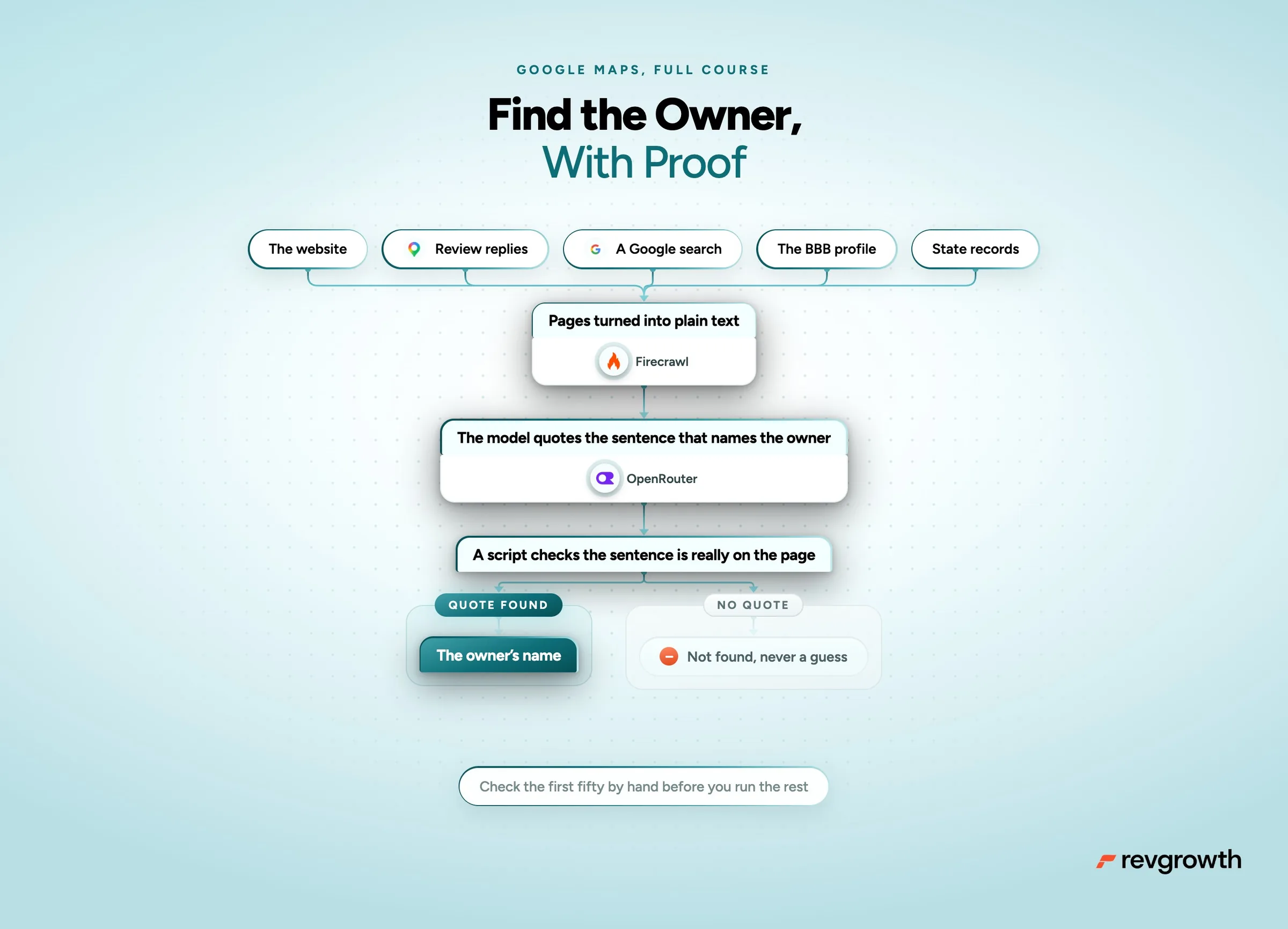
Owners show up in five places, so check them in this order.
- The website. About, Team, Our Story, Contact and the footer. "Founded by", "owner" and "Dr." are your clues.
- Their replies to Google reviews. Owners answer reviews, and plenty of them sign with their name and title.
- A Google search for the business name, "owner" and the city. Local news, chamber pages and podcasts name owners all the time.
- The BBB profile, which lists management for a lot of businesses.
- State records. In many states the secretary of state's business search names the managers or officers behind an LLC, and license lookups for trades like HVAC, plumbing and electrical show who holds the license.
AI does the reading. Crawl each business's pages with Firecrawl or a short script, turn them into plain text, and give each business to a model.
One rule keeps it honest. The model has to quote the sentence that names the owner, and a script checks that the sentence is really on the page. No quote, no name.
Here's a prompt to start from.
Below is text from one local business's website and its replies to Google reviews.
Find the owner, founder or main decision maker.
Return their first name, last name and title, plus the exact sentence that names them, copied word for word.
Only use a sentence that ties the name to a title like owner, founder, president, principal or doctor.
Never use a name from a customer's review.
If nothing qualifies, return "not found". Never guess.
Check the first 50 by hand before you run the rest. That's how you know what good actually looks like.
An open model through OpenRouter does this cheaply. At about 8,000 tokens of page text per business, 10,000 businesses cost around $13 on gpt-oss-120b.
Step 3: Get an Email (Where Local Lists Break)
Every bounce chips away at the domains your whole program sends from, so this step protects every campaign after this one.
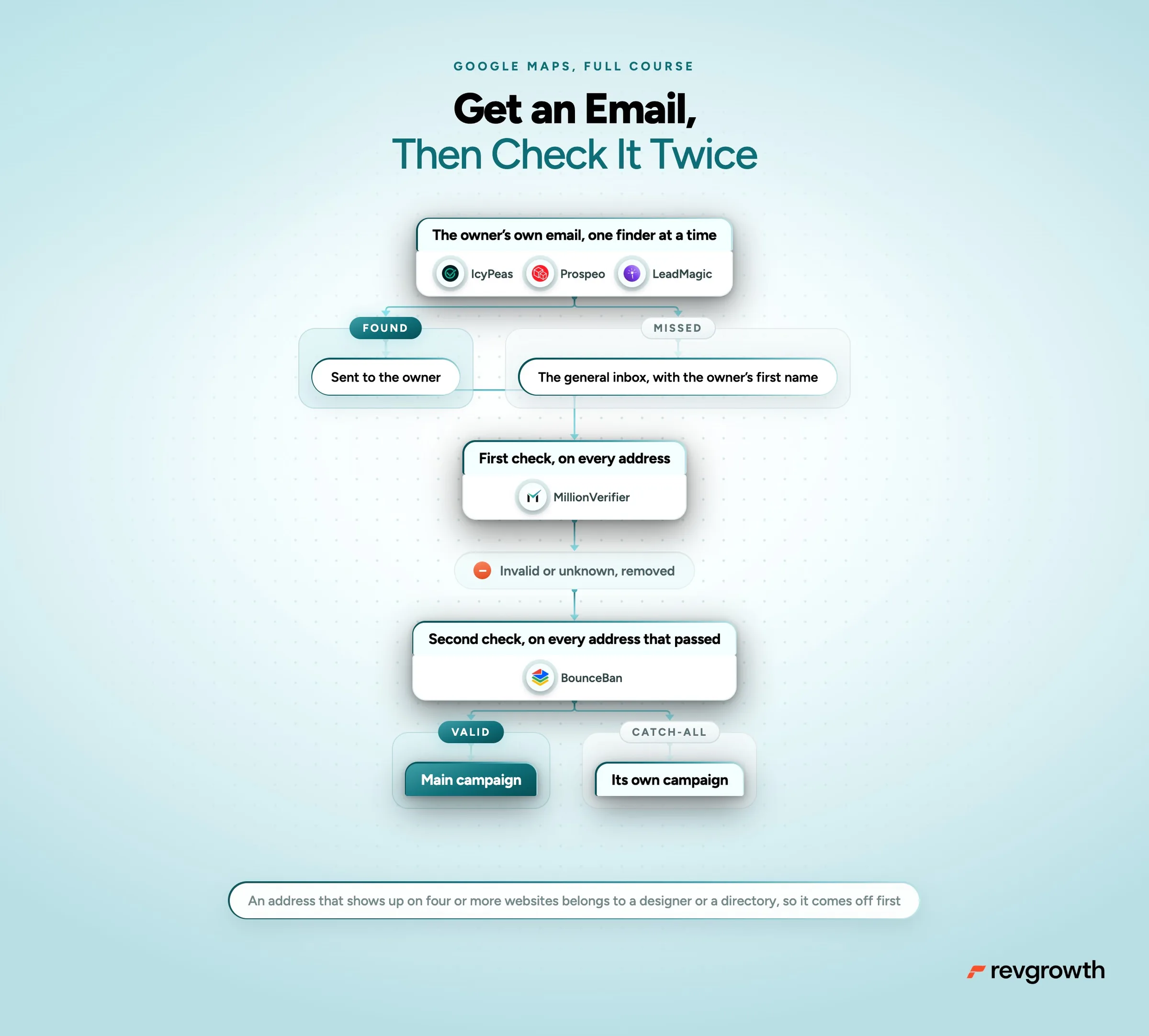
The owner's own email is the hardest field on the list. On the local lists we've built, we found it for 1 in 7 businesses at best. A general inbox like info@ or office@ turned up for a third to three quarters of them.
So build the campaign around the general inbox, with the owner's first name at the top.
At a business with eight people, the owner reads info@, or sits next to whoever does. "Mike," on an email to info@ still reaches Mike.
For the owner's own email, run one finder at a time and send only the misses to the next. IcyPeas, then Prospeo, then LeadMagic.
Then pull the general inbox off the home and contact pages for everyone left.
Drop any address that shows up on four or more different websites. Those belong to web designers, directories and font makers.
Then verify everything twice.
- MillionVerifier checks every address first
- BounceBan checks every address that passed
- Catch-all addresses, on servers that accept anything, go in their own campaign so they can't drag down the rest
Pause any campaign that bounces more than 3%, and find out why before you send again.
Step 4: Find Who's Buying Right Now
A list tells you who exists. A signal tells you who needs you this month, and that's who your reps should call first.
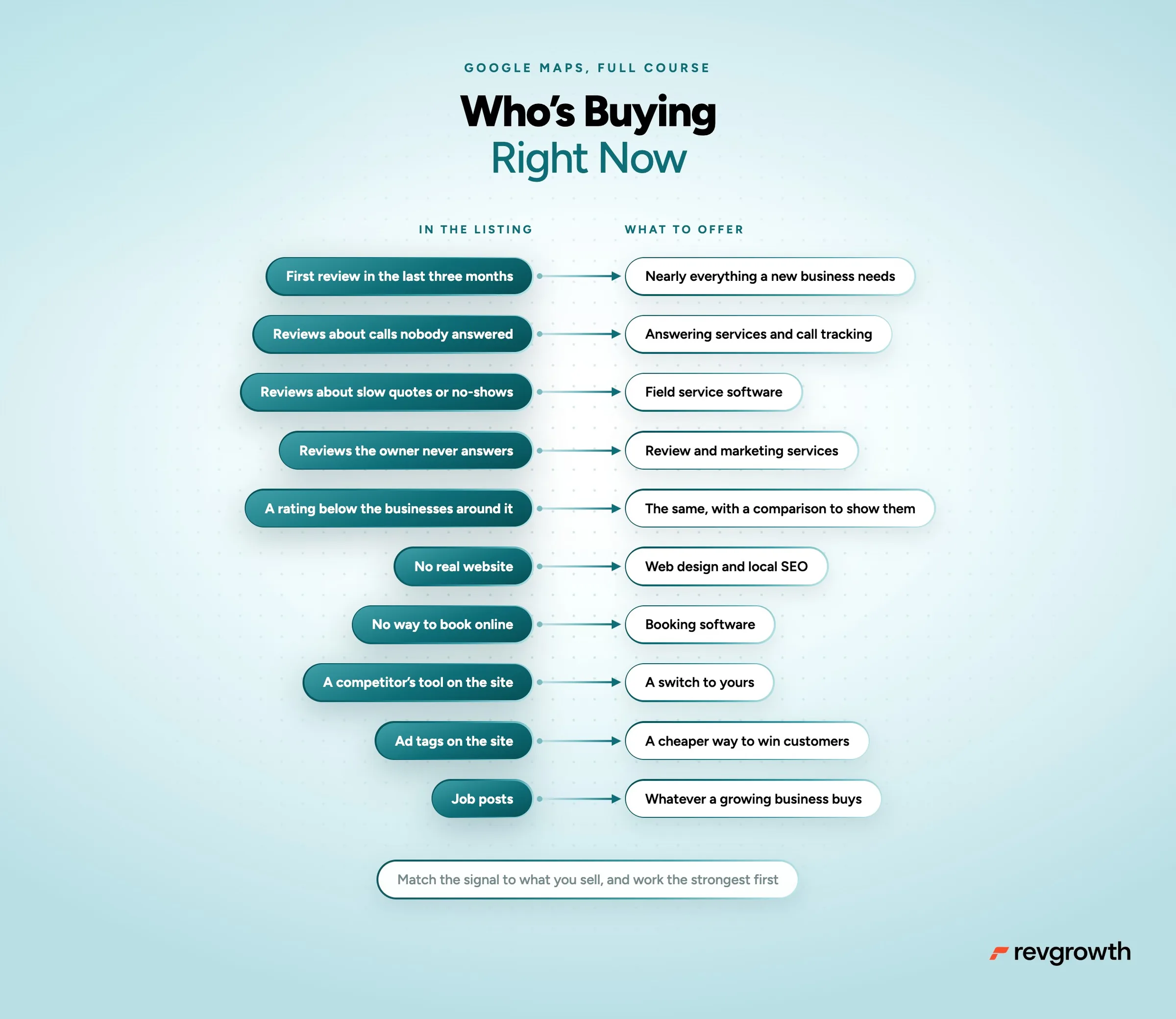
Every listing carries signals. Here's what they mean and what to offer.
- Their first review landed in the last 90 days. They probably just opened, and a new business needs nearly everything, from software and insurance to marketing and supplies.
- Reviews about calls nobody answered. They're losing jobs on the phone, an opening for answering services, AI receptionists and call tracking.
- Reviews about slow quotes or no-shows. Their scheduling is breaking, an opening for field service software.
- Reviews the owner never answers. Nobody is managing their reputation, an opening for review and marketing services.
- A rating below the businesses around them. Same opening, now with a comparison to show them.
- No real website, or a Facebook page where one should be. An opening for web design and local SEO.
- No way to book online. An opening for booking software.
- A competitor's tool on their site, like a booking widget or chat. If you sell software, that's a customer you can switch.
- Ad tags on their site, like the Meta pixel or Google Ads. They already pay to get customers, so they'll listen to a cheaper way.
- Job posts on Indeed. They're growing, and growing businesses buy.
Two rules keep signals honest.
Match the signal to what you sell. A review about a dirty lobby is a lead for a cleaning company and nobody else.
And when you search reviews for complaints, cut out the owner's replies first. A business apologizing for "billing issues" matches your search too, and your counts come out inflated.
Apify's Google Maps scrapers pull the reviews and the replies. The crawl from Step 2 already holds each website's code, so the tools and ad tags are one text search away.
Score each business by its signals and work the strongest first.
Step 5: Lead With Something Useful
Owners read email on their phone between jobs. The ones who reply got something useful in the first three lines.
- Open with the signal, in plain words, and only if it's true
- Give before you ask, something they can use even if they never reply
- Say who you are in one line, so they can judge the ask
- Ask one question they can answer with a yes
- Keep it under 75 words, with no link in the first email and no more than two emails
The biggest bang for your buck is a gift list. If your prospect sells to other businesses, hand them three buyers near them.
A commercial cleaner gets three offices nearby with recent reviews about dirty restrooms, each with a phone number.
If they sell to consumers, hand them a comparison instead, like their rating and reviews next to the three closest competitors.
Here's a signal email, for a company that answers phones for HVAC shops.
Mike, three of your last twenty Google reviews mention calling and not getting through.
For an HVAC shop, each of those is a job that went to whoever picked up.
We answer calls for HVAC companies around Houston and book the jobs straight into your calendar.
Want to see how we'd have handled those three?
And a gift list email, for a company that helps cleaners win commercial contracts.
Mike, I found three offices near you in Katy with recent Google reviews about dirty restrooms.
Their names, the reviews and their phone numbers are below.
We help cleaning companies win commercial contracts like these every week.
Want more like them?
Step 6: Call Them Too
The phone number is the one field nearly every listing has. In the Overture pull above, 99% of the roofers had one.
Owners pick up, and a call turns a list into meetings faster than email alone.
Call the businesses with the strongest signals first, and open with the reason you're calling.
If you emailed first, the email gives the call its reason. "I sent you three offices near you that need a cleaner. Did any of them look right?"
Log the hour of every conversation. After two weeks you'll know when owners in your niche answer, and that's when your reps dial.
Step 7: Pull It Again Every Month
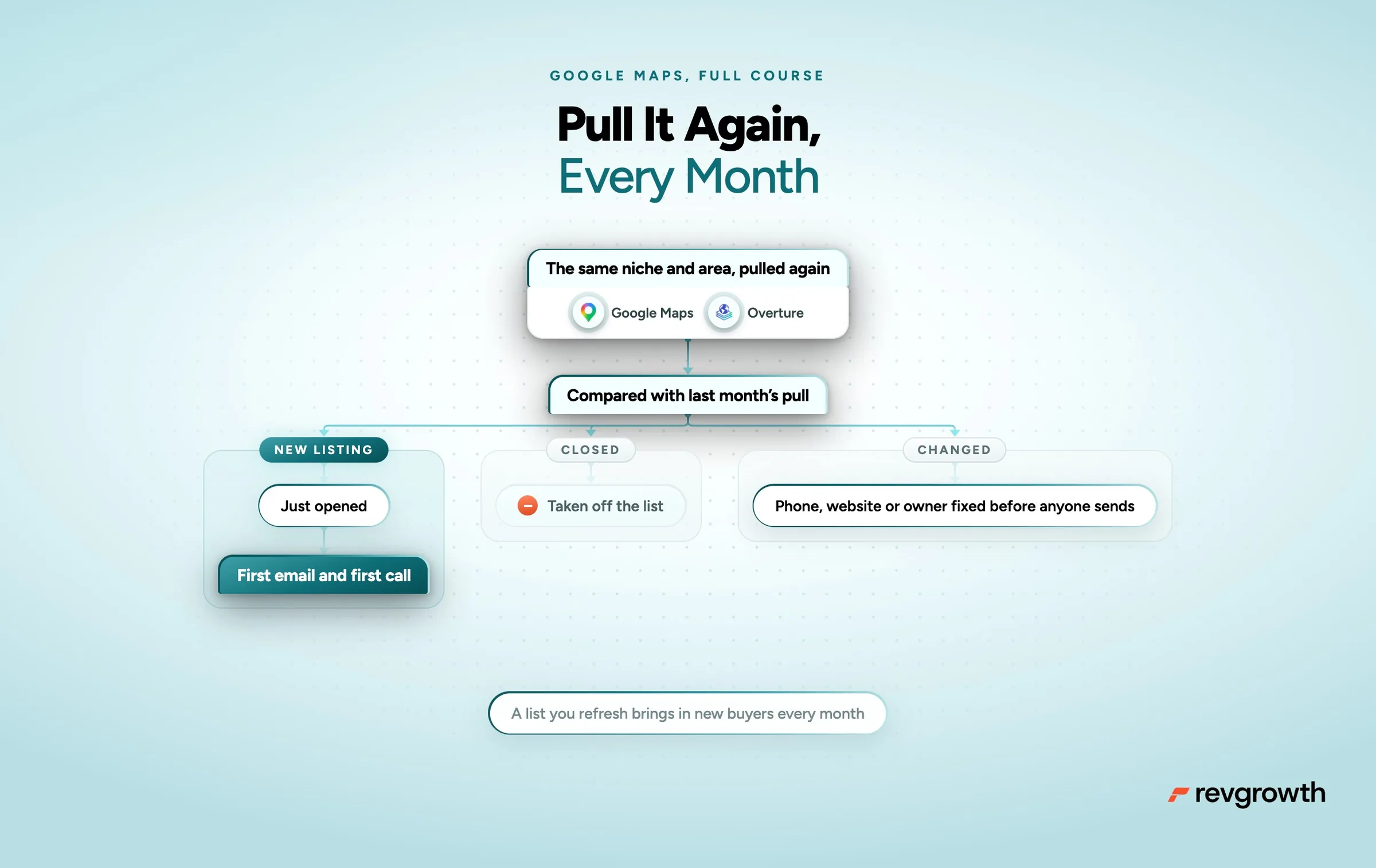
A one-time list gives you one month of pipeline. A list you refresh brings in new buyers every month.
Pull the same niche and area next month and compare it with the last pull.
- New listings are businesses that just opened. They get the first email and the first call.
- Listings that closed come off. Overture marks them as permanently closed, so it's one filter.
- A changed phone number, website or owner gets fixed before anyone sends.
What It Costs
Here's roughly what 10,000 businesses in one niche cost to build.
- Google Maps through Serper runs about a dollar per city per niche
- Overture is free
- The website crawl is free with a short script
- Finding the owner on an open model through OpenRouter comes to around $13
- MillionVerifier checks 10,000 addresses for under $40, then BounceBan checks the ones that pass
- The email finders for owners' own emails are your biggest line, so run them only on businesses that passed every filter above
What Your Sales Team Gets
- The whole local market, including the businesses no contact database has
- A real owner's name on every email, with proof behind it
- Reps calling the businesses that need them this month first
- Emails that hand the owner something useful before they ask for anything
- New businesses in the territory every month, contacted the week they open
Your First Week
One step a day.
- Pick one type of business in one metro
- Pull it from Google Maps ZIP code by ZIP code and from Overture, then merge on phone and website
- Cut the chains and the junk categories
- Run the owner prompt on 50 businesses and check them by hand
- Find emails, the owner's first and the general inbox next, and verify every one twice
- Tag every business with its strongest signal
- Email the top 200 and call them the same week
Where to Start
Start with Step 2 on a small sample. My philosophy is to prove the owner can be found before spending anything on emails.
If the prompt finds real owners in your niche, everything after it works. If it can't, switch niches before you spend a dollar on email finders.
Our Local Gift List play, which runs on a list like this one, is mapped step by step at revgrowth.ai/playbooks/local-gift-list