GTM Engineering, Explained: The Role, the Stack and the First 5 Systems to Build.
 Adam Abdur RahmanFounder, Revgrowth
Go-to-market now runs on data, AI and a stack of tools that don't talk to each other on their own. Someone has to connect them and keep them running.
Here's what a GTM engineer does, what the role replaces, the stack layer by layer, and the first five systems to build.
What a GTM Engineer Does
A GTM engineer builds your go-to-market as systems. The work sits between sales, marketing, ops and code.
Jeanne DeWitt Grosser, who has run go-to-market teams at Stripe and Vercel, describes Vercel's GTM engineers as a hybrid coding and ops role.
She also argues GTM should be treated like a product: prototype 5 to 10 variants of a motion, the way a design team tests screens.
The job comes down to three verbs:
- Build: turn a manual sales motion into a workflow that runs every day
- Connect: wire the data, AI, sending tools and CRM together, so records move without copy and paste
- Maintain: watch every system, fix what breaks, and ship the next test
Example: a rep used to read every reply and decide who to call. A GTM engineer builds the flow that reads, labels and routes each reply, then hands the rep a number and a script.
What the Role Replaces
In Grosser's account, Vercel's inbound SDR work went from 10 people to one person checking an agent a GTM engineer built. The other nine moved to outbound. You don't need Vercel's scale to see why.
Here's the shift, old way → new way:
- A list exported from one database → a market mapped from several sources
- One vendor's email check → two verifiers, one after the other
- A rep sorting a shared inbox → every reply labelled by intent and routed
- "Interested" called back tomorrow → a rep dialing within minutes, with a number and a reason
- A campaign that ends → a loop that sends non-responders back out with new messaging
Each line on the right is a system someone has to build once and keep running.
The Stack, Layer by Layer
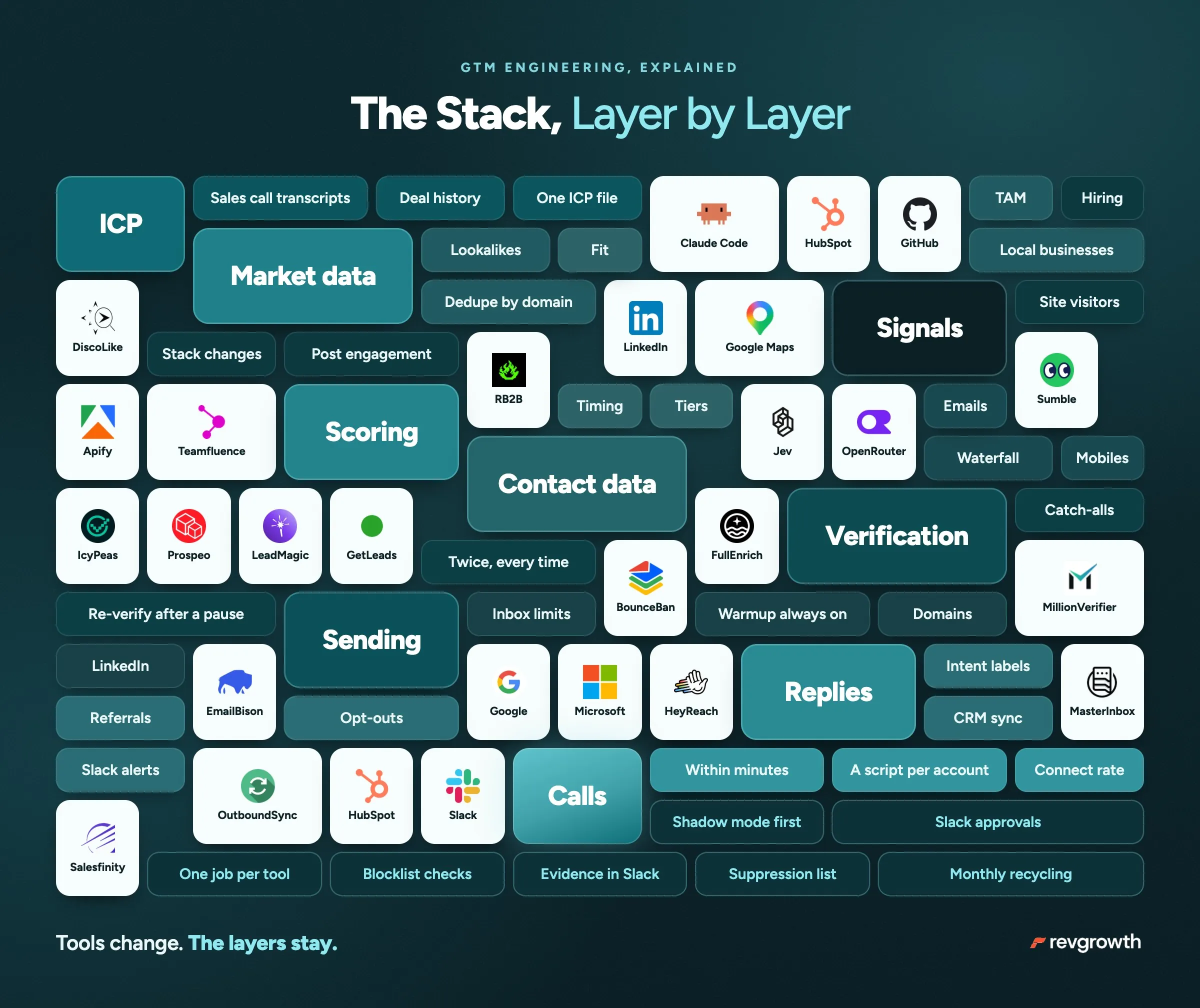
Tools change. The layers stay. Here's ours, from research to the phone call:
Research and ideal customer profile (ICP) → Sales calls transcriptions, Claude Code, HubSpot deal history and one ICP file in GitHub
Market data → DiscoLike, LinkedIn and Google Maps
Signals → RB2B for site visitors, Sumble for hiring and stack changes, Apify and Teamfluence for LinkedIn engagement
Scoring and sorting → Jev
Contact data → IcyPeas, Prospeo, LeadMagic and GetLeads for emails, then Prospeo and FullEnrich for mobiles
Verification → MillionVerifier, then BounceBan
Sending → EmailBison on Google and Microsoft inboxes, HeyReach for LinkedIn
Replies and CRM → MasterInbox, OutboundSync, HubSpot and Slack
Calls → Salesfinity
One rule keeps a stack honest: give every tool one job and write it down.
In ours, Jev only scores and classifies. Claude Code plans the sources, writes the queries and pulls the records.
Blur the jobs and you end up trusting a tool with work it never does.
The First 5 Systems to Build
Build them in this order. Each one feeds the next.
Step 1: A mapped market.
No single database holds a whole market, so pull from several. DiscoLike finds companies by what their websites say and by similarity to your best customers. LinkedIn adds its own slice. Google Maps covers local and owner-run businesses that list themselves there. Merge the sources and remove duplicates by domain first, then by company name and state, then by phone.
Treat any single source's count as a floor for your market size. A local, owner-run business can sit on Google Maps and in no sales database at all.
Step 2: Verification, twice.
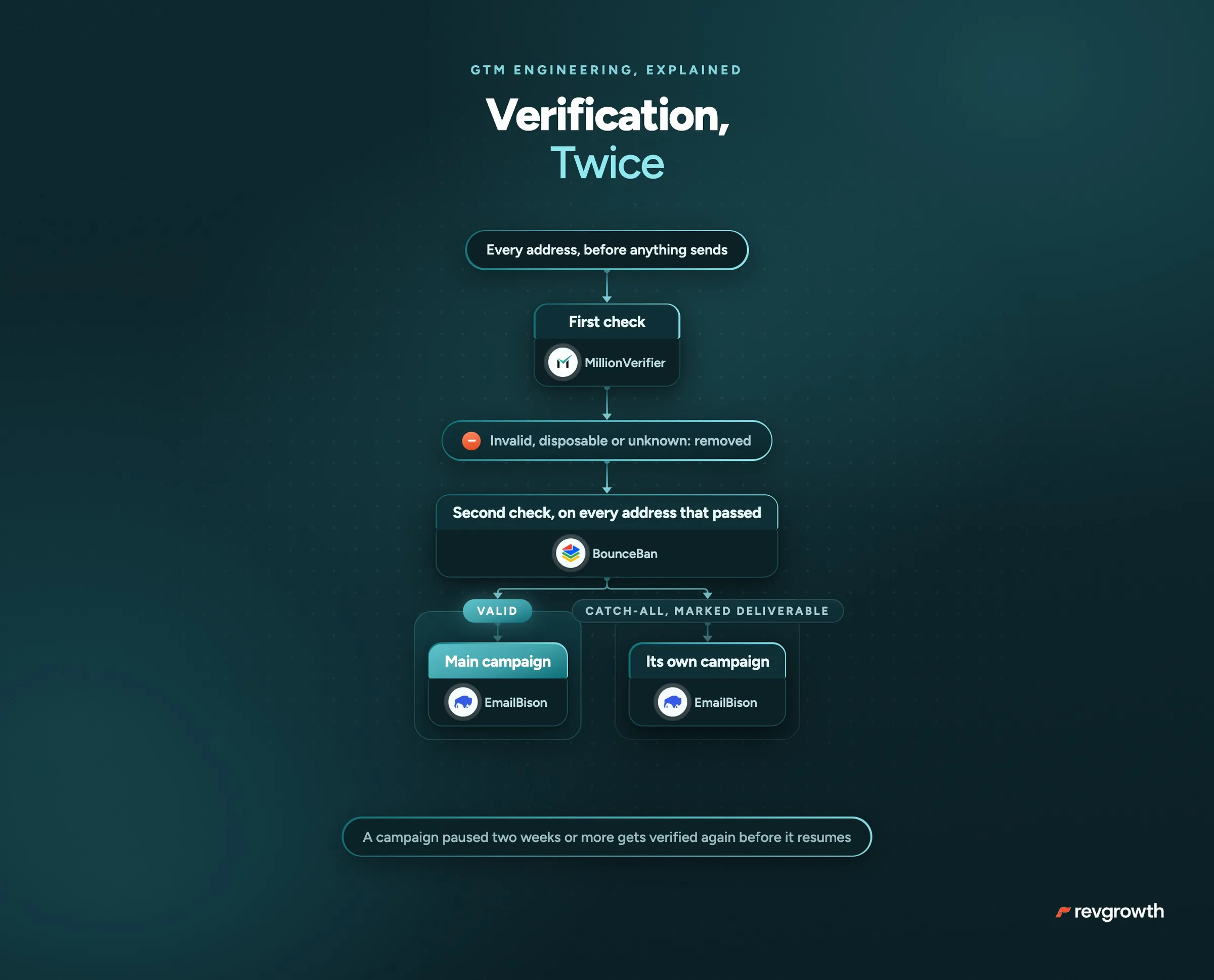
Every address gets checked by two different verifiers before anything sends. MillionVerifier checks every address first, then BounceBan checks every address that passes.
- Valid: into the main campaign
- Catch-all: kept only if BounceBan marks it deliverable, and sent from its own campaign so its results read separately
- Invalid, disposable or unknown: removed
An enrichment vendor's own check never counts as one of the two. A campaign paused for two weeks or more gets verified again before it resumes.
Step 3: Reply routing.
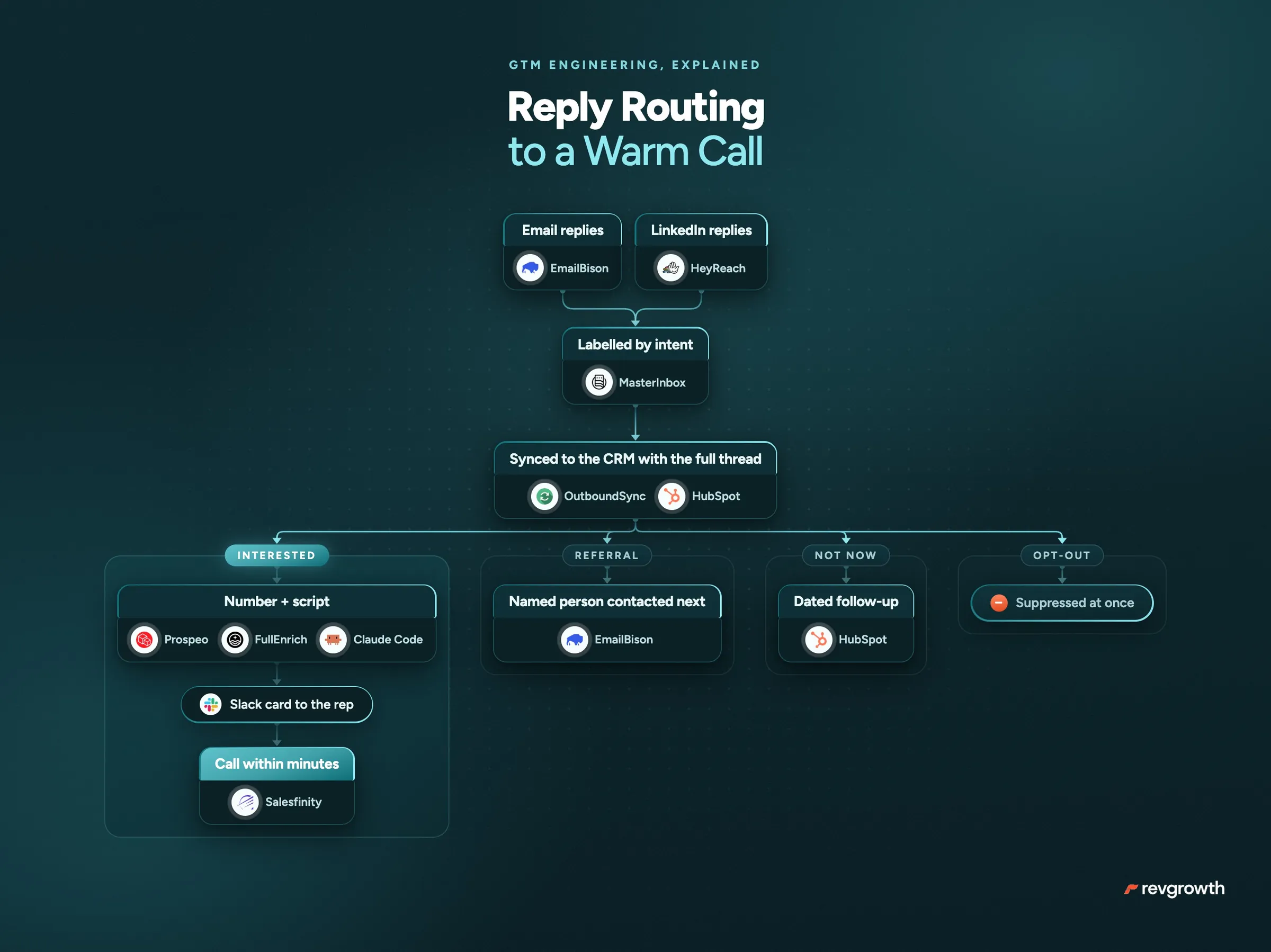
Replies from email and LinkedIn land in MasterInbox, where each one is labelled by intent:
- Interested: a reply or call task for the rep in HubSpot
- Referral: the person they named gets contacted next
- Not now: a dated follow-up instead of a call today
- Opt-out: suppressed at once
Leads sync to HubSpot through OutboundSync with the full thread, and Slack alerts the team on every routed reply and every booked meeting. A reply that says "talk to our ops lead" becomes a referral, and the ops lead hears from you next.
Step 4: Warm calls on interested replies.
An interested reply is the warmest a cold lead gets. The number comes from their signature first, then Prospeo, then FullEnrich. Sumble shows what's changing at the account, and Claude Code writes a short script that opens on it.
A Slack card hands the rep the reply, the number and the script, and the rep dials on Salesfinity within minutes. Every week, track time to first dial, connect rate by hour, and any reply with no dial after 24 hours.
Step 5: A monthly recycling loop.
Put your whole market in live campaigns. A contact who finishes a sequence without replying rests 30 to 45 days, then goes out again with new messaging. Between cycles:
- Jev + OpenRouter sorts every reply: interested, objection, not now, wrong person or opt-out
- New angles come from objections, sales calls, industry news pulled by Serper, and what Sumble shows your engaged leads have in common
- Claude Code drafts the experiments, and nothing new sends until a person approves it in Slack
- Sending domains get checked daily against blocklists, and burned inboxes get swapped out
- Every address gets verified again before the next send
Anyone who replied, booked, bounced or opted out stays out of the loop for good.
Who Runs It Day to Day
Building is half the job. The other half is making each system safe to run when the builder isn't watching. The rules we design by:
- The engineer owns the code. An operator runs each system from Slack and never touches code.
- Every scheduled job posts evidence to Slack: sample rows and the rendered emails. A count on its own hides the broken row.
- Agents gather the evidence. A person writes the angle. Automate the angle and you automate away the creative work the system exists to free up.
- Anything that spends money waits for a human yes. An agent can propose a purchase, and only a person approves it.
Example: buying new sending domains waits for the same Slack approval as a new experiment.
Where to Start
Starting from zero, make these three moves:
- Write your ICP down in one file: titles, company size, industries, geography and disqualifiers. Every system reads from it.
- Build the mapped market and the double verification before you send anything.
- Route every reply to Slack with its label and a phone number. That's the first system your sales team will feel.
Start with one system, get it running every day, then build the next.